Autocorrect. Spellcheck. Tab stops. Cut and paste. These are a few of the little things in word processing that are a mixed bag of blessings and curses. They may help us if we perpetually misspell “disease” but sometimes they may cause us to accidentally send a text to our mother to inform her that Dad’s hysterectomy went smoothly. I do most of my writing on my computer, and make regular notes on my iPhone, so I am constantly in a tussle with some smart technological device or other.
This includes the “Find and Replace” feature.
I only used this nugget of blessing once or twice in high school. I wasn’t very computer savvy, so most of my editing was accomplished with a printed copy, pencil, and eraser. Even now, I don’t have the feature quite figured out, except that I know it’s a tricky devil.
When I was working on Immortal Bond, my first novel, I spent the first few drafts trying to think of a decent name for the capital city and country of my setting. Until I decided on one, I just had the words “The Capital” as a place holder. Once I decided on “Cathair,” I opened up the Find and Replace box and found and replaced. This box has a deceptively helpful looking button labeled, “Replace All”. (Beware the Replace All button people. Beware!) I smiled benevolently at it. How sweet, I thought. Some programmer is saving me time. I clicked. I printed.
Somehow, every time “The Capital” was replaced with “Cathair” there was now an odd spacing issue. A sentence that once might have said: “Father, I can’t wait to get to The Capital!”, now said: “Father I cant wait to get toCathair !” I scratched my head, and manually fixed every single one.
Since then I’ve been more cautious.
So the other night when I changed a character’s name for the third, and hopefully final, time I was sweating.
This character suspiciously looks and acts very much like a friend of mine. In my first drafts, this character even, veeeeery suspiciously, had the same name. Obviously this would not do, so I changed his name to Don. It didn’t work for me at all. So my husband and I have been trying to rename him. Last night I decided to try Nick on for size. When I opened the find and replace box, I groaned. There was over 350.
I whined to my husband, “This is going to take forever.”
He shrugged and took the laptop from me. “Just do this.” The mouse hovered ominously over the “replace all” button. I squealed like a wild boar and slapped his hand away.
“Are you MAD?” I snapped. “D-O-N is in all kinds of words! It’ll turn all my ‘donuts’ to ‘Nickuts.’”
“Ooooh,” he mouthed and began to play with the box. A few seconds later he smiled at me. “Just do this!” He clicked a little checkbox that said, “whole words.”
I narrowed my eyes. “What will that do?”
“Watch.” He refreshed the box and the word count dropped by over 150. I turned my skeptical gaze to him.
“You sure that worked?”
“Of course.” His confidence eased my mind. I let him hit the “replace all” button then kissed him affectionately.
“You’re amazing!” I said, then skipped off to shower while he set it up to print.
Shortly thereafter, I was holding the first printed copy of my second novel in my hands. Giddy as toddler with a mini drum set, I sat down to play with my second child. I flipped open to a random page. My face fell.
“TIMOTHY YOU NINNY-FOPPER!”
Yes I did yell that for real. This is normal for me, for these are the names I call my husband. He did not respond. He was in the basement doing laundry. (See! How can I yell cuss names at a husband who does laundry without me even asking?)
He came up the stairs humming. I waited, patiently scowling at the door, until he stepped inside the bedroom. He saw my face and cocked his head at me.
“You are a Ninny-fopper,” I repeated, softer and with additional menace.
“Why?”
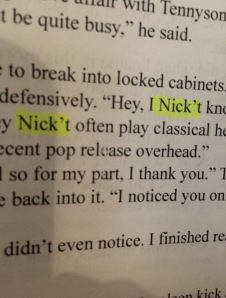
I motioned to him with one finger. He sat down beside me on the bed. I lifted my laptop onto my lap and opened the find and replace box. I typed the word “Nick’t” into the find section and got a little grey notification that said “167 found”.
Every “don’t” in my story was now “Nick’t”.
Timothy proceeded to hug me and say “I’m sorry” while simultaneously giggling. I changed all my “Nick’t”s back to “don’t”s in my document, but I refuse to print another copy. Save the trees and all that.

© Rachel Svendsen 2015


Hahaha!! Too funny 😀
LikeLiked by 1 person
So true. The d’efficiences of word processing. This happened to me too while writing a novel. I feel for you – cute anecdotes with your husband.
LikeLiked by 1 person
Reblogged this on Sacred Scars and commented:
I can relate to this story. I’ve used the “Replace All” many a time, sometimes with horrible results like this, sometimes with beautiful results.
LikeLiked by 1 person
Thanks so much. 😄
LikeLike
Hahaha loved this, how awful! Thanks for the tip, I am in the process of changing names in my novel, I best start reading from scratch! Horror!
LikeLiked by 1 person
Hahaha. Yes! Be careful of the modern day shortcut. They are the tricky ones. 😉
LikeLike
Lol. You two have such a cute relationship.
LikeLiked by 2 people
Thanks Bro. 😀
LikeLike
Haha! Funny story!
I’ve been through the same thing. That’s why I never use Replace All anymore. What I’ll do is just use Find and inspect each highlighted word to make sure I want to change it before changing it. No matter how many words I have to manually inspect and change, I Nick’t do it any other way. 😉
LikeLiked by 1 person
HAHAHA! Love this comment. 😀 You made me smile big.
LikeLiked by 1 person
Hahahaha, I completely understand! I once wrote an essay for my environmental science class and MS Word autocorrected “salinization” to “stalinization”! What?! Thank God I double-checked my essay before submission 😀 Liked the post! 🙂
LikeLiked by 1 person
hahaha 🙂
LikeLiked by 1 person